What's the Best Motorcycle Route App? Map Apps, Compared.
May 6, 2025
Tags:routesrecommendationstips
Motorcycle riders cover billions of miles every year in the U.S., and while the ride itself is the focus, figuring out how to get from one place to the next is always the first step. Between changing road conditions, traffic, and unfamiliar areas, having a reliable route app can make a big difference. Most general navigation apps aren’t built with riders in mind, which is why it helps to know which ones actually work well on a motorcycle. Below, we’re sharing what we’ve found to be the best motorcycle route app options and what you can expect from using each one on the road.
Disclaimer: This post is not sponsored by any of the below applications. Riders Share maintains our own opinions and recommendations for technology we think can help you during your ride! Information updated May 2025.
What makes a good motorcycle route app?
Not every navigation app works well for motorcycle riders. What you need on a ride is different from what works in a car, and the best apps are the ones that actually take that into account. A good motorcycle route app should give you tools that make the ride smoother, more enjoyable, and safer. Here are some features that really matter when choosing a route app made for riding:
- User-friendly design
- Custom display options
- Custom routes and ride planning
- Sharable routes
- Offline capabilities
- Road quality and condition info
- Bluetooth and headset support
- Community features
- Live traffic and weather updates
- Speed and distance tracking
- Fuel and rest stop info
Best Motorcycle Route Apps to Try Right Now
There are a lot of apps out there, but only a handful really stand out when it comes to planning and tracking motorcycle routes. These are the ones we think are actually worth using based on features, rider feedback, and how well they work on the road:
- REVER
- Scenic
- Calimoto
- Detecht
- Harley-Davidson App
- Kurviger
- Waze
REVER
Rever review rating (Apple): 4.7 ⭐12.3 ratings | Rever review rating (Android): 4.5 ⭐ 14.5k ratings
REVER has been around for a while, and it’s stayed popular for a reason. It’s designed specifically for motorcycle riders, so everything about it feels like it was built with the ride in mind. The app lets you plan routes, track your miles, and connect with other riders, but it’s the level of detail that really makes it stand out. You can choose your roads based on things like twistiness, elevation, or even just how scenic they are, which makes planning a lot easier if you’re trying to avoid boring highways.
The free version gives you plenty to work with, but if you’re doing longer rides or want access to more advanced tools, the REVER Pro subscription opens up extra features like live weather, offline maps, and turn-by-turn directions. It’s also worth mentioning that REVER works well with Bluetooth headsets, so you can keep your eyes on the road without missing your next turn.
Main Features:
- Route planning with filters for curvy roads, elevation, and more
- Ride tracking with detailed stats
- Offline maps for riding without service
- Weather and radar overlays (with Pro)
- Turn-by-turn voice navigation (with Pro)
- Social features for following friends, sharing routes, and joining challenges
- Compatible with Bluetooth devices and helmet comms
DOWNLOAD REVER ON THE APP STORE | DOWNLOAD REVER ON GOOGLE PLAY
Scenic Motorcycle Navigation
Scenic review rating (Apple): 4.7 ⭐6.9k ratings
Scenic is one of those apps that feels like it was built by someone who actually rides. It’s only available on iOS for now, but an Android version is currently in development. If you’re on an iPhone, though, Scenic has a lot going for it. It gives you full control over your routes, with the option to import, draw, or create them from scratch. You can even take an existing route and tweak it by adding waypoints or adjusting the path manually.
Where Scenic really shines is in how it handles offline navigation and voice-guided directions. Once you download a map, you don’t need a data connection to use it, which is a huge help in more remote areas. It also does a good job of recalculating your route without pulling you onto highways unless you want it to. Everything about it is designed to keep you focused on the ride without constantly checking your phone.
Main Features:
- Route planning with custom waypoint editing
- Offline maps with turn-by-turn voice navigation
- Options to avoid highways and stick to more rider-friendly roads
- Ride recording with speed, distance, and elevation tracking
- Easy route imports from GPX files or other apps
- Re-routing that avoids taking you off your original style of ride
- Clean, rider-friendly interface made specifically for iOS
DOWNLOAD SCENIC MOTORCYCLE NAVIGATION ON THE APP STORE
Calimoto
Calimoto review rating (Apple): 4.6 ⭐812 ratings | Calimoto review rating (Android): 4.1 ⭐47.6k ratings
Calimoto is a good option for riders who like to take the scenic route without having to dig too deep into planning. The app automatically builds routes based on your preferences, which can be a time-saver if you just want to ride without spending a ton of time customizing every detail. You can choose how curvy you want the roads to be, how long you want to ride, and the general direction you want to head, and Calimoto takes care of the rest.
It also tracks your rides, saves your stats, and gives you the option to explore routes shared by other riders in the app’s community. While the free version covers the basics, you’ll need the premium plan to unlock full offline maps and access more advanced features. Still, the core experience is solid, especially if your goal is to find fun roads without having to map them all out yourself.
Main Features:
- Automatic route planning based on preferred road types and ride time
- Curvy road filtering to avoid straight, busy routes
- Ride tracking with speed, distance, and elevation data
- Offline maps available with premium
- Community-shared routes you can browse and ride
- Integrated ride stats and trip history
DOWNLOAD CALIMOTO ON THE APP STORE | DOWNLOAD CALIMOTO ON GOOGLE PLAY
Detecht
Detecht review rating (Apple): 4.7 ⭐2.7k ratings | Detecht review rating (Android): 4.2 ⭐2.4k ratings
Detecht is a bit different from other route apps because it focuses just as much on safety as it does on navigation. It was built with rider protection in mind, and one of its standout features is crash detection. If something goes wrong during your ride, the app can automatically alert your emergency contacts with your location — no extra equipment needed.
Navigation-wise, Detecht gives you standard route planning and ride tracking tools, but it also logs your lean angle, speed, and other ride stats that some riders like to keep an eye on. You can plan your own routes or follow ones shared by others in the app, and there are options to avoid highways or busy roads if you want a more relaxed ride. It’s not the most advanced in terms of custom route building, but what it offers works well and is easy to use.
Main Features:
- Built-in crash detection and emergency contact alerts
- GPS navigation with basic route planning
- Ride tracking with lean angle, speed, and distance stats
- Route sharing and community features
- Safety-focused tools for solo or group rides
- Automatic ride logging
DOWNLOAD DETECHT ON THE APP STORE | DOWNLOAD DETECHT ON GOOGLE PLAY
Harley-Davidson App
H-D App review rating (Apple): 4.8 ⭐35.9k ratings | H-D App review rating (Android): 4.7 ⭐19.3 ratings
Even if you don’t ride a Harley, it’s hard to ignore how much this app has improved over the last few years. The Harley-Davidson App isn’t just about dealerships and events anymore, it’s become a fully functional ride planning and tracking tool that more and more riders are actually using day to day. In fact, it’s one of the most-used motorcycle apps out there right now, especially for those who want to log rides, plan custom routes, and stay connected with the larger riding community.
What’s nice about this app is how clean and organized everything feels. You can build a route turn by turn, save your favorites, and even browse through rides other people have shared. There’s also a social side to it, where you can join challenges and track your progress over time. If you do ride a Harley, it also connects directly with certain models to show things like fuel level, range, and tire pressure. But even without a Harley in the garage, there’s still a lot to like.
Main Features:
- Custom route planning with turn-by-turn navigation
- Ride recording with stats, milestones, and saved routes
- Community rides, events, and challenge tracking
- Integration with certain Harley-Davidson models for vehicle info
- Dealer locator and service reminders
- Clean interface with easy-to-use ride tools
DOWNLOAD THE HD APP ON THE APP STORE | DOWNLOAD THE HD APP ON GOOGLE PLAY
Kurviger
Kurviger review rating (Apple): 4.6 ⭐54 ratings | Kurviger review rating (Android): 4.4 ⭐ 4k ratings
Kurviger doesn’t have the same name recognition as some of the other apps on this list, but it’s quietly built a loyal following, especially among riders who care less about the extras and more about finding good roads. The app is all about avoiding highways and focusing on twistier, more scenic routes. You can choose how curvy you want the ride to be, and it’ll plan your route accordingly, which is great if you’re more interested in enjoying the ride than getting there fast.
It leans more toward the practical side, so you won’t find social features or community ride sharing here. But what it does, it does well. The interface is pretty straightforward, and you can use it in combination with other navigation apps if you prefer voice guidance from somewhere else. It works especially well for riders in Europe but still gets the job done for U.S. roads too.
Main Features:
- Route planning focused on curvy, motorcycle-friendly roads
- Multiple route options based on ride preferences
- Avoid highways, ferries, and toll roads
- Export GPX files for use with other apps or devices
- Works with offline maps (Pro version)
- Simple, no-nonsense layout that keeps the focus on the ride
DOWNLOAD KURVIGER ON THE APP STORE | DOWNLOAD KURVIGER ON GOOGLE PLAY
Waze
Waze review rating (Apple): 4.8 ⭐3M ratings | Waze review rating (Android): 4.2 ⭐8.8M ratings
Waze wasn’t built just for motorcycles, but it does a surprisingly good job once you set it up right. What makes Waze different is how it relies on real-time user reports to alert you about traffic, road hazards, police, and anything else that might pop up during a ride. It’s quick, constantly updating, and does a great job of helping you avoid slowdowns or sketchy road conditions.
For motorcycle riders, there’s a setting buried in the app that’s worth turning on. Under “Settings” → “Navigation” → “Vehicle Type,” you can choose Motorcycle. Once that’s set, Waze adjusts its routing based on how motorcycles typically move through traffic, which can mean more accurate ETAs and routing options that make more sense for two wheels. It won’t give you scenic backroads or twisty route suggestions, but if your focus is on getting around city traffic or commuting, it’s one of the most useful apps you can keep on your phone.
Main Features:
- Real-time traffic, hazard, and police alerts from other users
- Motorcycle mode with adjusted routing and estimated times
- Voice-guided, turn-by-turn navigation
- Automatically reroutes you around traffic or delays
- Easy-to-read maps with current road conditions
- Fuel stop suggestions based on your route
DOWNLOAD WAZE ON THE APP STORE | DOWNLOAD WAZE ON GOOGLE PLAY
So, What is the Best Motorcycle Map App?
If we had to pick just one, REVER stands out as the best all-around motorcycle map app right now. It combines detailed route planning, ride tracking, safety features, and community tools in a way that actually works for riders, not just drivers. It’s flexible enough for solo trips, group rides, or long-distance touring, and the Pro version adds extra features like offline maps and weather overlays that come in handy more often than you'd think. For most riders, REVER offers the right balance of control, convenience, and riding-specific features all in one place.
That said, the other apps we covered are all great in their own ways: some are better for casual weekend rides, others for safety, and a few are ideal if you're just trying to get through traffic. It really comes down to what you want out of the ride.
Is there a Google Map motorcycle route?
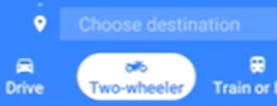
In short, yes, but only for select locations and on the Google Maps app. You can select this by reviewing your destination below where the standard “car” or “bus” options are- you may see a motorcycle button. Google’s motorcycle directions show you routes away from roads where motorcycles aren’t allowed. You might be pointed towards shortcuts along narrower side roads.
If you don’t see this button, try updating your Google Maps or resetting your phone.
How do I map a motorcycle ride?
Depending on your application or website, the exact directions on how to map a motorcycle ride may differ. Generally speaking, when creating a route, you should have your starting point location, end-point location, and any stops along the way. If you prefer specific highways or scenic routes rather than the most “optimized” location an app may create, manually add each road you’d like to take along the way.
For added protection on and off the road, try a GPS tracker
⭐⭐⭐⭐ – 4.7 Stars out of 1,893 reviews
While exploring the best routes for your motorcycle journey is thrilling, ensuring the security of your ride is equally important. That's why we're mentioning the benefits that Monimoto can provide you – a smart motorcycle GPS tracker that's a game-changer for your peace of mind. It’s wireless, and we honestly set it up in less than 10 minutes. Plus- the battery lasts forever. It offers easy setup, low maintenance, and advanced GPS tracking. Monimoto guards your motorcycle against theft and unauthorized movement. Imagine enjoying a scenic route and taking a break to check out a scenic vista at a popular spot, knowing that your bike is protected through Monimoto’s alarm system. If unauthorized bike movement occurs, you’ll receive a phone call in under 1 minute with live location tracking. It’s a great companion for every rider, complementing your route-planning apps by adding an extra layer of security to your adventures on the road.
Get the Monimoto security system for added protection on your rides HERE.
Plan Your Ride with a Motorcycle Rental from Riders Share
Once you’ve picked the best motorcycle route app for your ride, the next step is finding the right motorcycle rental to go with it. That’s where we come in. At Riders Share, we connect you with thousands of bikes across the country through our peer-to-peer motorcycle rental platform. Whether you’re planning a day trip, a weekend ride, or something longer, you can browse by location, style, or price to find a motorcycle that fits your plans. And because our rentals come from real riders, you’ll often find unique models and better pricing than you’d get at a traditional shop. Pair that with the right app, and you’ll have everything you need to make your next ride a good one.

Before You Pick Your App
Before you download anything, think about what kind of rider you are and what you actually want from an app. Some riders want every detail mapped out, while others just need basic directions and a way to track their miles. There’s no one-size-fits-all answer, so the best motorcycle map app for you really comes down to how you ride and what matters most on the road. Try a few, see what fits, and don’t be afraid to switch it up until you find one that actually makes your ride better.
Related Articles
Mon - Fri: 8-8 CT
Weekends: 9-8 CT
